4.2. Site codebook (locations)
Sites (or locations) are the points of sale / branches of your company. If you have only one place from which you operate, you will need only one site. If you have several shops or warehouses, each can be a separate site.
Every invoice belongs to one site. The site's mark becomes part of the invoice numbering series (e.g. the "A-" prefix for shop 1, "B-" for shop 2).
4.2.1. Where it opens
From the main menu: Codebooks → Sites / Locations.
The "Site Codebook" window shows a list of all sites linked to the active issuer.
4.2.2. Site fields
Clicking Add or Edit opens a "Site" window with three fields:
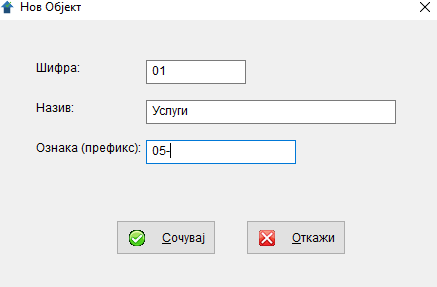
| Field | Description | Required |
|---|---|---|
Code |
Short site code (e.g. "01", "SK", "PL"). Up to 4 characters. | ✅ yes |
Name |
Full site name (e.g. "Skopje — Centre", "Ilinden Warehouse"). Up to 30 characters. | ✅ yes |
Mark (prefix) |
Prefix shown before the invoice number when printing (e.g. "A-" → the PDF shows "INVOICE no. A-48"). Up to 10 characters. | no |
When to add a prefix
If you have multiple sites and want to visually distinguish them on the printed documents, adding a prefix is useful (e.g. "SK-", "BT-"). The BR_FAK itself in the database is an integer with a per-year, per-issuer sequence — the prefix is purely cosmetic, it is added to the PDF title and is not part of the stored number. If you operate from a single place, leave it blank.
4.2.3. Saving and deleting
- Save — saves the site after the required-field check. "Data saved successfully." appears.
- Cancel — closes without saving.
- Delete (from the list) — ⚠️ a site with invoices cannot be deleted. The message appears: "This site cannot be deleted because an invoice has been created for it."
4.2.4. Minimum configuration
If you have no branches, a single site is enough:
| Code | Name | Mark |
|---|---|---|
| 01 | Main seat | (blank) |
This is the most common case. All invoices will automatically be tied to this site.
4.2.5. Tips
- 💡 The site number need not be sequential. You can use any short code scheme — e.g. "SK" (Skopje), "BT" (Bitola), etc.
- 💡 Changing the prefix. The prefix is not stored with the invoice — it is added to the PDF title at print time. If you change the prefix from "A-" to "SK-", all invoices (new and old) will be printed with the new prefix the next time the PDF is opened. BR_FAK itself does not change.
- ⚠️ Do not delete sites of old invoices. Although the system prevents this, you should know that the site is part of the invoice's identifier for the general ledger.
← Back to contents | Previous: Partners ← | Next: Clauses / Texts →